ESS Link Card Child
Navigate to 'Create New' -> 'Object Definition and fill in the following values into the header section:
Property | Value | Notes |
|---|---|---|
Code | d4i_LinkCard_ESS_Child | |
Effective Dating | From Parent | |
API Visibility | Editable | |
Status | Active | |
Label | Employee Document Child | |
MDF Version History | Complete History | |
Subject User Field | | |
Workflow Routing | | |
Pending Data | No | |
Fields
In the 'Fields Section', for 'externalName' select details
- In the details screen, set the value of 'Visibility' to 'Not Visible'
Set the following fields on the cust_d4i_LinkCard_ESS_Child:
Name | Length | Data Type | More |
|---|---|---|---|
externalCode | 100 | AutoNumber | This should exist, set type |
Category | 100 | Generic Object | In Details, Set Valid Values Source to cust_category Set label to Document Category Set Required to Yes |
DocumentType | 100 | Generic Object | In Details, Set Valid Values Source to cust_DocumentType_LinkCard1 Set Label to Document Type Also in Details, for Field Criteria, set 'Source Field Name' to cust_Category.mdfSystemInternalCode and 'Destination Field Name to cust_Category Set Required to Yes |
CollectionType | 256 | String | |
d4iUploadStatus | 38 | Picklist | In Details, Set Valid Values Source to LinkCard_DocStatus |
attachment | 38 | Attachment | Set Required to Yes |
Security
Update the Security section with the following values:
Property | Value | Notes |
|---|---|---|
Secured | Yes | |
Permission Category | Miscellaneous Permissions | |
RBP Subject User Field | | |
CREATE Respects Target Criteria | No | |
Base Date Field For Blocking | | |
Business Rule
The next step is to create a rule that will concatenate Category and Document Type into a single field that is used for data collection
Click on the plus next to 'Save Rules' to open 'Configure Business Rules'
Select 'Basic'
Name | Value | Notes |
|---|---|---|
Rule Name | LinkCard_CollectionType_Child | |
Rule ID | LinkCard_CollectionType_Child | |
Base Object | Employee Document Child | |
In the IF statement section, select the 'Always True' checkbox
Set the following Concatenation Rule:
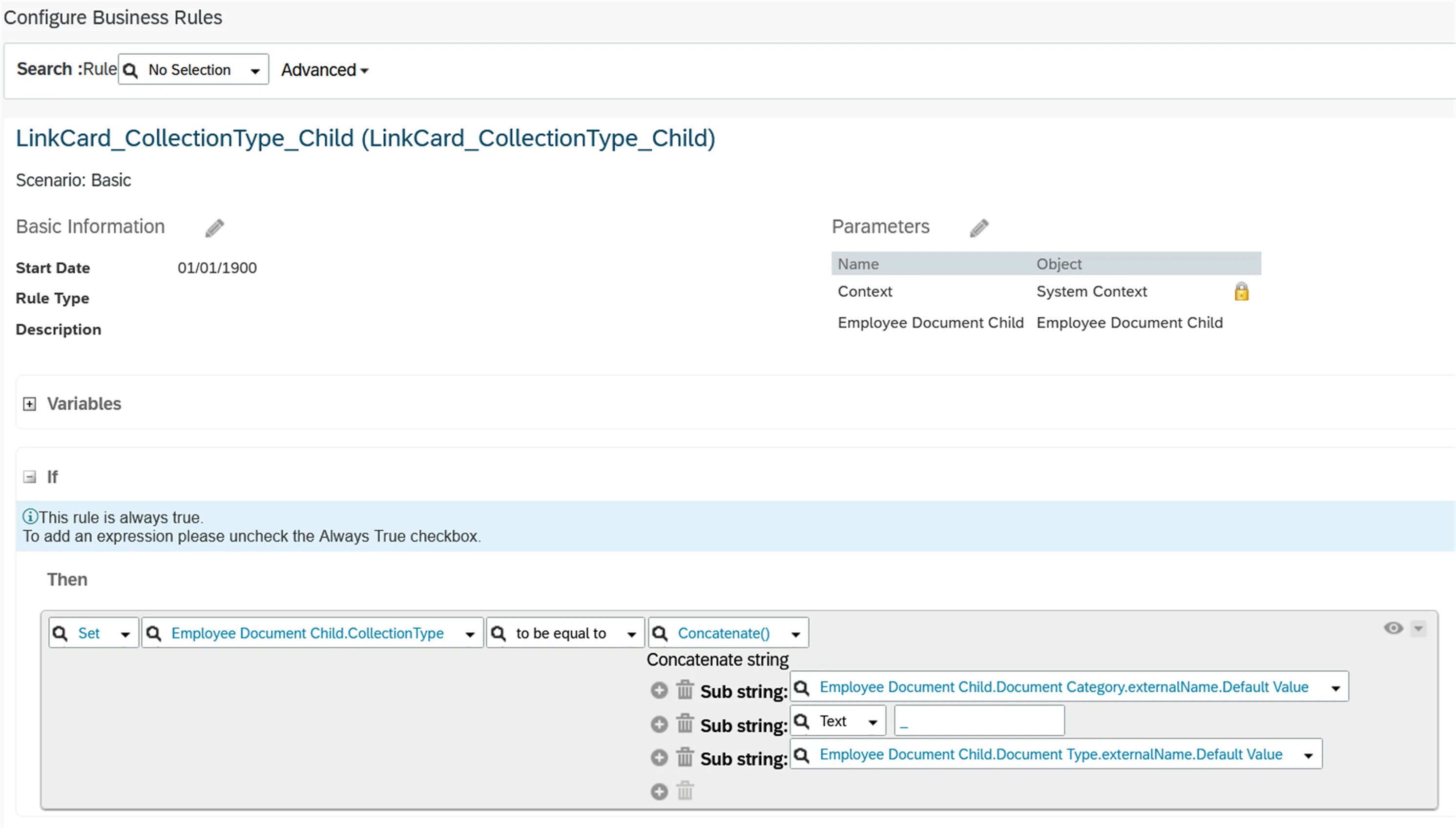
Save your changes to complete the rule
Navigate back to the Admin tool Configure Object Definitions
Open the ESS Link Card object and take action->make correction
Go to the section 'Save Rule'
- Select the LinkCard_CollectionType_Child rule that was just created and save the object